Decades into the smartphone era, seven billion people communicate with one finger on a virtual QWERTY keyboard. Why not arrange the keys for one-finger typing, with the spacebar and most common letters in the center? Jean Ichbiah did that in 1995 with his FITALY keyboard, and no one noticed.
Here are my arrangements:
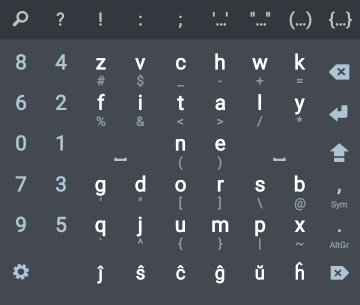
On the left is Ichbiah's FITALY, to which I've added digits, symbols, and Esperanto diacritics. If you don't use Esperanto, you can fill those seven slots with whatever you like. A long press on a letter gives the symbol below it; feel free to add symbols under the digits and bottom-row letters.
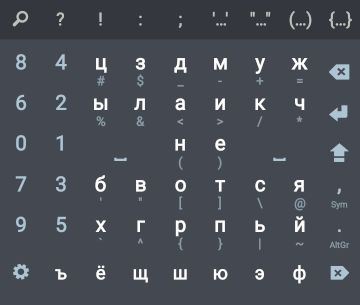
On the right, I've tried to create something similar for Russian. I calculated, for billions of permutations, how far a finger would need to travel to type the complete text of Anna Karenina. In fact there are 263 decillion (2.63×1035) permutations of 32 letters, so mine might not be ideal, but it looks pretty good.
With digits, I put 1, 2, and 3 nearest to the spacebar because 30% of numerals in documents start with 1 and another 30% with 2 or 3, according to the Newcomb–Benford law.
You can use these layouts for free on your Android device. Go to Google Play and install Multiling O. Hold a finger on the spacebar, drag it to Layouts, choose [ + DIY ], and paste the following text:
{
"title":"62FITALY",
"onScreen":{
"main":[
"84zvchwk[DEL]",
"62fitaly[ENTER]",
"01[SPACE][]ne[SPACE][][SHIFT]",
"73gdorsb[SYM:,]",
"95qjumpx[ALTGR:.]",
"[TOOL] ĵŝĉĝŭĥ[FDEL]"
],"sym":[
"  #$_-+= ",
"  %&<>/* ",
"  ³²()÷× ",
"  '\"[]\\@ ",
"  `^{}|~ ",
"" ] } }
or
{
"title":"62RUSSIAN",
"onScreen":{
"main":[
"84цздмуж[DEL]",
"62ылаикч[ENTER]",
"01[SPACE][]не[SPACE][][SHIFT]",
"73бвотся[SYM:,]",
"95хгрпьй[ALTGR:.]",
"[TOOL]ъёщшюэф[FDEL]"
],"sym":[
"  #$_-+= ",
"  %&<>/* ",
"  ³²()÷× ",
"  '\"[]\\@ ",
"  `^{}|~ ",
"" ] } }
To change these layouts, paste them into an editor (I use QuickEdit),
then copy and paste the result into Multiling O.
Sadly, Multiling O has been abandoned, and no longer works with newer versions of Android. Fortunately I learned of another program called Unexpected Keyboard that provides similar functionality. The maps for it are
<?xml version="1.0" encoding="UTF-8" standalone="yes"?>
<keyboard name="62FITALY" script="latin">
<row>
<key c="8"/>
<key c="4"/>
<key c="z" nw="\#"/>
<key c="v" nw="$"/>
<key c="c" nw="_"/>
<key c="h" nw="-"/>
<key c="w" nw="+"/>
<key c="k" nw="="/>
<key c="backspace"/>
</row>
<row>
<key c="6"/>
<key c="2"/>
<key c="f" nw="%"/>
<key c="i" nw="&"/>
<key c="t" nw="<"/>
<key c="a" nw=">"/>
<key c="l" nw="/"/>
<key c="y" nw="*"/>
<key c="enter"/>
</row>
<row>
<key c="0"/>
<key c="1"/>
<key c="space" width="2.0"/>
<key c="n" nw="("/>
<key c="e" nw=")"/>
<key c="space" width="2.0"/>
<key c="shift" nw="capslock"/>
</row>
<row>
<key c="7"/>
<key c="3"/>
<key c="g" nw="'"/>
<key c="d" nw="""/>
<key c="o" nw="["/>
<key c="r" nw="]"/>
<key c="s" nw="\\"/>
<key c="b" nw="\@"/>
<key c="," nw=";"/>
</row>
<row>
<key c="9"/>
<key c="5"/>
<key c="q" nw="`"/>
<key c="j" nw="^"/>
<key c="u" nw="{"/>
<key c="m" nw="}"/>
<key c="p" nw="|"/>
<key c="x" nw="~"/>
<key c="." nw=":"/>
</row>
<row>
<key c="?" nw="!"/>
<key c="ĵ" nw="£" shift="1.0"/>
<key c="ŝ" nw="€"/>
<key c="ĉ" nw="₽"/>
<key c="ĝ" nw="°"/>
<key c="ŭ" nw="²"/>
<key c="ĥ" nw="³"/>
<key c="delete"/>
</row>
</keyboard>
and
<?xml version="1.0" encoding="UTF-8" standalone="yes"?>
<keyboard name="62RUSSIAN" script="cyrillic">
<row>
<key c="8"/>
<key c="4"/>
<key c="ц" nw="\#"/>
<key c="з" nw="$"/>
<key c="д" nw="_"/>
<key c="м" nw="-"/>
<key c="у" nw="+" ne="ӯ"/>
<key c="ж" nw="="/>
<key c="backspace"/>
</row>
<row>
<key c="6"/>
<key c="2"/>
<key c="ы" nw="%"/>
<key c="л" nw="&"/>
<key c="а" nw="<"/>
<key c="и" nw=">" ne="ӣ"/>
<key c="к" nw="/" ne="қ"/>
<key c="ч" nw="*" ne="ҷ"/>
<key c="enter"/>
</row>
<row>
<key c="0"/>
<key c="1"/>
<key c="space" width="2.0"/>
<key c="н" nw="("/>
<key c="е" nw=")"/>
<key c="space" width="2.0"/>
<key c="shift" nw="capslock"/>
</row>
<row>
<key c="7"/>
<key c="3"/>
<key c="б" nw="'"/>
<key c="в" nw="""/>
<key c="о" nw="["/>
<key c="т" nw="]"/>
<key c="с" nw="\\"/>
<key c="я" nw="\@"/>
<key c="," nw=";"/>
</row>
<row>
<key c="9"/>
<key c="5"/>
<key c="х" nw="`" ne="ҳ"/>
<key c="г" nw="^" ne="ғ"/>
<key c="р" nw="{"/>
<key c="п" nw="}"/>
<key c="ь" nw="|"/>
<key c="й" nw="~"/>
<key c="." nw=":"/>
</row>
<row>
<key c="?" nw="!"/>
<key c="ъ"/>
<key c="ё" nw="£"/>
<key c="щ" nw="€"/>
<key c="ш" nw="₽"/>
<key c="ю" nw="°"/>
<key c="э" nw="²"/>
<key c="ф" nw="³"/>
<key c="delete"/>
</row>
</keyboard>